Showing posts with label Computers. Show all posts

Thursday, September 12, 2024

Laptop Computer Setup

Today, I began working on setting up my new Lenovo IdeaPad 1 Windows laptop microcomputer:

Lenovo IdeaPad 1 Laptop, 15.6” FHD Display, AMD Ryzen 5 5500U, 8GB RAM, 512GB SSD, Windows 11 Home, 720p Camera w/Privacy Shutter, Smart Noise Cancelling, Cloud Grey, $331.00 from Amazon on 9/11/2024. Supposedly, it runs Windows 11 Home quite well, has decent battery life, is sturdy and light in weight, and has a better sound system.


I will set up the Lenovo laptop for full featured use of the Internet (Chrome and Bing, My Homepage), Facebook, Blog, Amazon, Kindle, Atlantis, Website Links ...

Also, and most important, I want to use the new Lenovo laptop for music recording, music editing, DAW (Digital Audio Workshops: FLStudio, Ableton), Band in a Box Software, percussion software, MIDI keyboard connectivity, home music studio hardware and software, music composing, sound mixing, musical theory research, voice alteration Humanoid, ...

In September, 2024, I stopped using my old refurbished HP Elitebook 8470P laptop which I purchased for $250 in January, 2022,, except for photography work. I stopped using my old Galaxy 1 Tablet A in September 2024, except for music playing. Both older units are slow, have battery problems, do not work properly sometimes, have old hardware/software, etc. I'm removing some files from both, deleting some programs, and cleaning them up.

Musical Practice and Developmental Pointers

Suggestions Harvested by Michael P. Garofalo

Tips from a Beginning Harmonica Player

Harmonica Studies: A Beginner's Notes, Research, Resources, and Comments.

September 2024


Thursday, June 27, 2024

Computer Tablet

I have used a Samsung Galaxy Tab A (2017 Tablet) for 7 years. I have all my favorite MP3 or WAV music on this Tablet, with many backups. Tab A has a viewing screen of 6.75 inches high and 4.15 inches wide. The Tab A is on the heavy side alone, and a bit heavier with a sturdy Braecn rubber protective cover with a swivel back grip.  Functional running Android software, I use Kindle Ebooks for reading. Comes with 32 GB internal storage, and I use 40 GB of a 150 GB SD Card. I get OK connectivity with the Tab A at home using WiFi from my XFinity cable services. This old Tab takes longer to charge, and faster to discharge.

Time to upgrade. So, I purchased a ....

Kadybe, Android 14 Tablet, 2024, 10 inch Tablet with 128GB Storage 1TB Expandable, 14GB RAM, Dual 4G Cellular Tablet with keyboard Support 5Ghz WiFi/Bluetooth 5.0/GPS, Octa-Core Processor, FHD IPS Screen, $173.00 Amazon. It comes with a compatible Blue Tooth connected standard keyboard.  


We shall see if I am satisfied.  I worked Thursday night and Friday morning and afternoon on getting the new Kadybe Android Tablet running the software I need and like to use. 


I purchased the FL Studio Mobile software for the Tablet, $29.00 once, for use in music recording, musical studies, harmonica recordings, learning to read standard musical notation for melody lines.  I also purchased a condenser lapel microphone and a 4 channel audio mixer.


Saturday, January 29, 2022

Our Family Photography Projects for 2022

We are now working on a  Family Photographs Project.

Phase 1

This involves the tedious process of collecting together all of our digital photographs from our two desktop computers, one laptop computer, cell phones, OneDrive, tablets, CD collections, and four external hard disk drives. 

We ended up gathering together 58,000 digital photographs into 450 Folders and using up 156 GB of external hard disk drive space.  I did some rough organizing, file renaming, weeding duplicate folders, and placing them all in one Folder (named "Photographs of BKG and MPG") on one Seagate 5Tb external hard disk drive.  Then, I backed up this one Folder on all the other three external hard disk drives.  

A lifetime of our personal digital photographs-- now all safe in one place, roughly organized by year, with backups.  I am sure we will add a few stray Folders of digital photos from the past, and our family or friends might add some other older digital photos.  

Also, now there is a new storage home for all the digital photographs that we will be adding after January of 2022.  Using my Canon SX740 digital camera, I intend to compose and transfer many more thousands of photographs before I die.  

I am studying two books on this new software. First, the book by Scott Kelby titled "Adobe Photoshop Lightroom Classic 2021".  I am following his instructions.  This 'Lightroom' book is very informative and useful to me.  Second, the book by Rob Sylvan titled "Adobe Photoshop Lightroom Classic For Dummies 2019."  

I've always enjoyed working with database software and databases (manual and electronic) since 1963. I used Microsoft Access and Microsoft Excel and other database software many times in my professional employment.     

My first import into Lightroom was with 10 Test Folders so as to learn how to use Lightroom for Importing and doing basic classification and cataloging markup after importing a Folder.  I am taking my time.  I imported just one Test Folder, and then learned how to do classificatory mark up on individual photos or on larger groups of photos using keywords, search terms, signature presets, special collections, presets, rating flags, etc.  Plenty more to learn about Importing and using many other Lightroom functions in the Library Mode.   

Then, one by one, I will import into Lightroom the 450 Folders in "Photographs of BKG and MPG" and do the markup for each Folder.  Gradually, during February of 2022, I will complete the importation of all the 450 Folders containing 58,000 digital photographs.  

As a former professional Librarian for over 40 years, I find Lightroom to be a very good tool for the database management of digital graphic images.  

Our digital cameras, mostly Canon, over the decades, output digital files in the .jpeg format.  Lightroom can easily handle a wide variety of digital formats.  

Phase 2

In late January of 2022, we set up two portable tables with chairs in front of the fireplace in our larger TV/Reading room.  We placed our HP laptop and the new photo scanner on the tables.  

Then, we began the slow and tedious process of gathering together all our old paper photographs, both black and white photos, as well as color photos.  The old paper photographs were found in boxes, photo albums, drawers, plastic cases, on bookshelves, and in file cabinets.  They were found inside the house, the garage, the attic, the closets.  

We scan all the paper photographs with the Plustek Photo Scanner.  We are both very satisfied with the speed and ease of use in scanning, the quality of pictures scanned, the numerous software options, and its file handling.  It can output scanned files in .jpeg and other digital formats.  

A few of the best or treasured old paper photographs are kept, some of the best are sorted out and given to family members or friends, and many are tossed into the trash can for the landfill.  All are scanned!

These paper photographic images are now all digitalized.  Later, if needed, an images or group of images can be tweaked for digitalized quality or artistic improvements using Lightroom or Photoshop.  

Folders of the scanned paper photographs are then Imported into Lightroom and roughly classified or quality rated.  


Phase 3

Gather together all our photographic slides.  
Scan all these slides into new Folders.
Import into Lightroom the digitalized images of slides in the Folders.  

We will be using the Kodak Slide and Scan hardware and software for scanning color slides.  


Hardware and Software

In our home in suburban Vancouver, Washington, we have two small bedrooms each converted into a home Office and reading room.  Sometimes, on many cold days, to reduce our electric consumption, we only heat these two Office rooms.  Each of us has their own cozy den for reading, napping, electronic connectivity, and entertainment.  And, each of these rooms have a Dell desktop and other connected electronic equipment and gear.  Mostly old equipment, but working fine.  We have Comcast XFinity for Internet and telephone and umpteen channels.  

We are both using an old "renewed" HP Desktop Elitebook 8470p Laptop, Core i5 3320 m 2.6ghz - 8GB DDR3, 128 GB SSD, DVDRW, Windows 10 Pro 64 Bit.  $260, renewed, recycled, saved, or rescued.  Basically, an  old dog of a heavy computer.  It seems to be passing all my tests of performance, e.g., checked CDRW and audio today.  My little puny ASUS laptop died two weeks ago.  I use a Seagate 4Tb external hard disk drive.

Paper photographs Scanner:  Plustek Photo Scanner.  Ephoto Z300, scan 4x6 photo in 2 seconds.  It includes three software applications: scanner mode, picture quality editing and cropping mode, and file manager mode.  $215.  We are both very satisfied with the ease of use, quality of pictures scanned, software options, file handling.  

Digital Photo Viewer Portable:  Aluratek 10" digital photo frame w/4GB built in memory, USB SD/SDHC support, $85.00.  A nice gift for somebody special - including selected photographs that you have taken of them.  

I keep my Notes About Photography in a hypertext notebook.  

I pay for using Adobe Lightroom Classic and Adobe Photoshop, $10 a month.  


Makenna


Friday, January 21, 2022

A Blogger's Hardware Setbacks and Steps Forward

Suddenly, my thin ho-hum ASUS laptop computer, used for field work and play, lost the ability to connect to my home wifi, then went blank and would not turn on again.  It could not be revived, despite my heroic medico-laptop efforts.  Sadly, this weakly little laptop was pronounced dead on 1/21/2002 at 3:54 am.    

Things break down and don't work anymore and my wallet hurts.  

I went on a Yurt Camping trip from Monday (1/17) to Thursday (1/20) to Nehalem Bay State Park near Manzanita, Oregon.  All my writing about my travel experiences, nature studies, poetry, notes, and some photographs for this trip were lost, gone, taken to the grave in the hard-drive-soul of my dead ASUS laptop.  

Yes, a setback, a cheap laptop equipment failure,  DaRn$##!!XX**!, lost written work, no warranty backup, and my wallet groans.  

Home Office Desktop System:
I write, manage photographs, read my Kindle books and Internet documents, search the Internet, and use computer software on my home office desktop computer set up.  I run a big Dell desktop computer, Epson printer and scanner, and external hard drives.  I have a nice big Samsung computer screen. Yes, and all the associated peripheral electronic gear and goodies.  Also, I use a Samsung Galaxy A32 cellphone power-house will fast T-Mobile 5G.  Very Nice, very cool, very powerful, with it, current, and my wallet moans again.    

Recently, as a sad story goes on, I upgraded from Windows 10 to Windows 11 on my desktop.  Sadly, my trusted webpage editor, Front Page 2003, no longer can inset photos in a webpage.  Yikes,  DaRn$##!!XX**!.  Still have to solve this problem with Front Page.

History!  Figure out and find solutions.  Move on!  

What Steps Forward?  Do It!!

So, I bought a used and refurbished HP Elitebook 8470P laptop.  My wallet shed a $250 tear.  We shall see how this hefty businessman's travel tool works for me.  

Lot's of extra computer laptop work ahead for me in the weeks ahead.  Time, time, time ...

I use my Cloud Hands Blog as searchable electronic filing cabinet.  Blogger software is simple and free.  Material can be used elsewhere in webpages.  All blog files can be backed up.  Handy.  Sharable!

I do use the laptop in the field for viewing pictures taken.  For taking photographs, I use a Canon EOS Rebel T7/2000D, a Canon SX740 PowerShot, and my cellphone Galaxy A32.   

I do regular backups on external hard disk drives from my desktop and laptop.  


Monday, October 11, 2021

Struggling Somewhat

 I've not been feeling well this past week.  High blood pressure, fatigue, chills, upset stomach, coughing ... feeling sick.  Mostly rested under the covers, and read and watched TV.  

I purchased a small laptop computer.  I will load my purchased Windows software this week.  

Keeping up with home chores.  Day by day fixing problems, cleaning, sorting, arranging ...

Feeling my age, 75, lately.  


Friday, August 13, 2021

Cell Phone Samsung Galaxy A32 5G

My daughter, April, put the SIM card in this new cell phone.  I am under her Samsung account.  She gave the new phone to me when we all had dinner at the Koran Barbeque restaurant on Thursday night.

My new Cell Phone is a Samsung Galaxy A32 5G.  

Busy setting up and learning this advanced cell phone.  

The photographic options are superior to my last cell phone, a older Samsung 7.

These phones run on the Android operation system.

Reception is good throughout the areas in both Washington and Oregon that we travel within.  


Monday, January 13, 2020

Keyboard Fun Over the Years

I first learned to use a manual typewriter in 1960.  I think it was a Hermes 3000, purchased by my parents.  I became keyboard proficient and could type up to 55 words a minute with a high degree of accuracy by 1961.  I used a portable manual typewriter, office typewriter, or electric typewriter in high school, college, and at my part-time City of Commerce Library job from 1961-69.  


In 1970, I volunteered for and was assigned to work as a Personnel Specialist at the Keesler Air Force Base in Biloxi, Mississippi.  I coded IBM cards with personnel information.  In 1971, I was working at Keesler in Officer Personnel Information Services and using a Burroughs online computer system and a computer keyboard (no mouse).  I was honorably discharged from the U. S. Air Force in 1973 with the rank of E5.  

Keesler was part of Air Training Command, and trained upwards 15,000 Air Force personnel each month primarily in electronics used by the U.S. Air Force.  I met with officers and enlisted men on their personnel business, and helped them with processing in and out of Keesler for temporary duty training.  At that time, 1970-1973, the U.S. Air Force was extremely busy in the destructive Vietnam War.  


From 1973 until 2017 I was employed where some kind of computer keyboard or electric typewriter was at my workstation, office, or at nearby locations.  I was employed as a librarian, supervisor, manager, coordinator, adminstrator, writer, technology and media services supervisor, teacher ... with my fingers on dozens of keyboards over the decades.  

The keyboard and mouse have been my interaction with computer software.  I still have a great computer set up at home in 2020.   

So, a keyboard under my fingers controlling computer software or mechanical typewriters has been an essential part of my educational life, scholarly life, librarianship life, community service life, employment life, professional life, creative life, or daily life from 1960-2020.  The skillfull, speedy, and effective use of keyboards and mice controlling computer software is critical and essential to succes in business in 2020.  

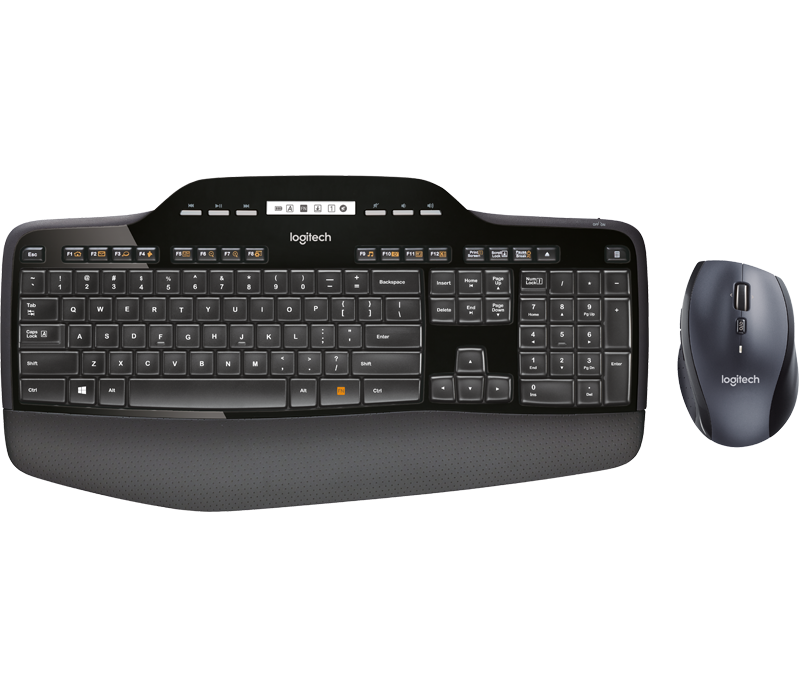
In 2020, I now use a Logitech MK 710 wireless keyboard and mouse in my home office connected to a Dell Inspiron desktop computer running Windows 10.  

Wireless Desktop MK710 0  


Some of my webpage reading Keyboard Shortcut Favorites are:

Ctrl + F    Search the document to Find something

Ctrl + +   Increases the size of the font displayed on the screen for html documents

Ctrl + -    Decreases the size of the font displayed on the screen for html documents

Ctrl + P    Prints the document displaying on the screen

Windows Symbol + E   Opens the File Manager Explorer   


Wednesday, December 25, 2019

Home For the Holidays

My best wishes to all for a peaceful and pleasant winter holiday season.  May we remember our accomplishments this past year, have few regrets, and hope for good health, peace and prosperity.  May our shared history make us proud.  May the Earth rest and bear the sweetist Wenatachee cherries and gently cradle the mighty Columbia River.


Katelyn, Mike, Karen, Makenna, Beryl


We have our Christmas and New Year Celebrations with family and friends.  This year we did Italian style meals.  Karen and I decorated interiors of our house with typical holiday season art.  We exchanged presents and best wishes.

Today, our children and their families will have lunch together at our home: lasagna, brocholli beef roll, cardoon (Texas Celery, artichoke stalks cooked, breaded, and fried), wine, and ourdourves.  Karen is positive and joyful.  Feasting for Fun!  Good Cheer!

Time for my NEW YEAR RESOLUTIONS:
Walk our dog Bruno once each day.
Learn how to effectively use CorelDRAW 2019 and Corel PaintShop Pro 2020 software.
Take a class in drawing.
Practice Tai Chi Chuan in class led by Jill Ross on Friday and Saturday.


Because of my interests and hobbies, and the fact that I am now retired at age 73, I spend a lot of my time indoors in my office, study, mancave, den, reading room, art studio, hang out space, retreat, etc.

The temperatures outdoors are mostly in the 40F's these days, and it gently rains a lot.  There are few gardening chores in December.  My reading and writing ROOM is nice and dry, cozy, and comfortable.  The room is insulated.  I always dress to stay warm.  I use an electrical heater set at 50F.

My STUDY is about 10'x12'x8'.  Bookshelves that we made cover the north and south wall.  A window faces south.  A small closet is on the east side of the room.  In front of the west wall is a large table with computer equipment.  Another small wood table is on the south side is used for art projects, reading, laptop computer, games.  The room is carpeted, but I would prefer a hardwood floor for easier rolling on my large office chair.

The computer equipment in my home OFFICE includes a Dell Inspiron desktop with Windows 10, Epson Workforce WF-3640 Printer, Samsung 21"dia screen, Logitech keyboard, old Toshiba laptop, and an Epson Perfection V600 scanner.  I purchase Internet access, and other services, from XFinity Comcast.  My annual modest earnings from my websites keep me current with computer hardware and software every four or five years.

Here is a photo of my STUDY, looking to the south on a foggy winter day.  There is a large sweet gum tree in our front yard.  I can use the wood table for drawing and art projects, books, laptop computer, digital camera equipment, a game, or a small  electronic keyboard.


My dog, Bruno, thinks my study/office/studio is his DOG CAVE.


Thursday, November 28, 2019

Indoor Playing


I spent a lot of time in November on seting up my new desktop Dell Inspiron computer.  Getting my FTP and personal desktop arrangements set up is always detailed work.  Next week, I will look into SSL certificates from BlueHost.  I've now spent $170 on newer software. I also worked on Karen's HP Desktop and an old laptop (Toshiba Satellite) we use.     

It has been cold outside with temperatures in the low 40's F.  Not much rain here in Novemeber, a record low.  I don't have much enthusiasm for gardening or a need to do much gardening in late autumn as dormancy is dominant now.  We still try to do some outdoor work in the garden each day.  Lately we have been raking leaves from our huge sweet gum and using as mulch, cutting down overgrown shrubs, transplanting, potting, path laying, fencing and lattice work.  

Mostly, on these cold days, I've been busy indoors reading, web publishing, research, using computers, doing art work, and writing.  I work in a cozy, warm, and dry home office/study/computer room.  

I enjoy watching the game of basketball on NBA League Pass and follow West Coast teams: Los Angeles Lakers, San Francisco Warriors, and Portland Trailblazers.  Football season is ending.  I watched all the University of Southern California college football games (my and my father's alma mater), and many West Coast NFL teams games.  

I spent a lot of time on reformatting and updating webpages in my Tao Te Ching website.  Updating and editing can be such tedious and time consuming puttering around.  I've also read a lot of books, essays, and articles about the Daodejing and Taoism.  

I have developed and maintained many hypertext documents which I have published online as webpages.  I began this activity in 1994.  I use Blue Host as my web host.  

Finally, I got an old copy of Fireworks working in Windows 10.  I used this software a decade ago while learning about, playing with, and creating concrete poetry.  I'm also learing how to use CorelDraw 2019 to create vector graphics.  I will try to publish one .gif or .jpg file each Sunday.  

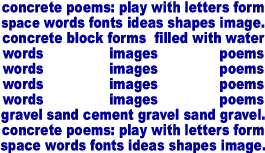
I call one series of graphic arts:  TeXtArT.  It is an attempt to create a kind of "art" using letters in different arrangements.  The letters can come in different fonts, colors, shapes, sizes, directions, etc.  Sometimes, the letters take the shape of objects, the so called, "concrete poem."  Concrete poetry has been an interest of mine since 2001.  


Tuesday, November 19, 2019

Upgrading Our Home Computers

The last time I purchased a desktop computer (HP Pavilion $399) for my home office was in January of 2017.  I upgraded to a Dell Inspiron 3670 ($599) desktop computer (12MB RAM, 1 TB Hard Disk, Intel chip, this week.  I use a Logitech wireless keyboard and mouse.  My home "office" is a cozy bedroom (10'x12') with a south facing window converted into an work space with bookshelves, computer equipment, table, cabinet, lighting, heating, and a chair.  

Of course, I am busy with the new computer setup, file backup, copying between two computers, reloading software, reusing the old software.  Thus far ... pretty smooth setup of Google Chrome browser, MacAfee security software, and file maintainence.  My old favorites seemed to load OK in Windows 10 (with new updates), e.g., Front Page, Fireworks, Dreamweaver MX, Cute FTP, Google Chrome.  I need better headphones/microphone unit with driver software.  Completed Phase I on 11/21 at noon.  

I often used Macromedia Fireworks to make concrete poems.  However, I can't get the old software to load properly on this new Windows 10 computer.  Adobe purchased Fireworks and stopped supporting.  You can't register anymore.  So, I am going to try using CorelDRAW home and student suite for $74.00.  Adobe Illustrator is $22.00 a month to suscribe.  

After I finish with my computer, then I will start on Karen's new computer (Dell Pavilion) and the remodel of her small home office.  

I have been a computer enthusiast since my days of working as a Personnel Specialist in the United States Air Force from 1969-1973.  Also, working for the County of Los Angeles Public Library System from 1974 to 1998 gave me many opportunities to learn and use computer systems for public services and managerial purposes.  Even as a retired old man, at home, I now use a Samsung Android cellphone on Sprint; XFinity TV, Phone, and Internet services; CD player, audio MP3 player, Dell Inspiron desktop computer, Samsung Tablet, Kindle Reader, laptop computer, and electronic gadgets galore.  Using computers at home is a hobby of mine.  

Friday, August 24, 2018

Computer Problems

My computer has been disabled for awhile due to a variety of software, virus, and malware mischief.

Thus far, I've spend many hours and $200.00 to recover.

I still don't have Front Page 2003 or Cute FTP back working.  Therefore, no website maintenance since July, 2018.

What an annoying hassle for me.


Saturday, January 27, 2018

Corning Union Elementary School District Employment

I was employed part-time for the Corning Union Elementary School District from 1999 until July of 2016; 17 years.  

I worked during the academic school year (August to June) for 119 days each year; normally, 3 days for 8 hours per day each week (Tuesday, Wednesday, Thursday).  My schedule was flexible, and I earned overtime on many occasions.  I had unpaid vacation for a week around Thanksgiving, two weeks for Christmas, one week in February, one week at Easter, and most of the summer from June 2 to August 15.  

From 1999-2005, I was employed in a certificated position as the District Librarian.  I managed five elementary school libraries, textbooks, and computer labs.   I took two elementary education credential classes per semester at California State University at Chico during this period, so as to keep the certificated position. 

From 2006-1916, I was employed in a classified management position as the Technology and Media Services Supervisor.  I managed five school libraries, computer labs, and textbooks and consumables for 2,300 students in grades K-8.  I also wrote many grants, and did the budget management for grants totaling $4.2 million to this district.  I was also a certified substitute teacher during this period.  We opened four new libraries in this district during my tenure there.  My office was at the Maywood Middle School Library.  


Technology, Media, and Libraries Services Group
Donna, Maria, Christina, Jeanie, Jackie, and Mike in 2014


Many classes visited our five school libraries each week


Karen and a Special Education Class of students


Children Everywhere All the Time


We managed over a dozen computer labs in five schools


Our service group had many behind the scenes storage areas


Working on textbooks for 2,300 students


Student Library Volunteers


Talking with and Helping Students


Working on the East Lab Grant with Mr. Dillon


Working with great teachers like Marna Whitley


Thursday, January 05, 2017

Off and Running

I finally got my new computer loaded with all the software I use.  Some old software would not reload in Windows 10 - what a hassle and disappointment.  

I am using the Atlantis Word Processor ($45) and the Google documents spreadsheet.  I use Microsoft Front Page 2003 for my simple website publishing. Google Chrome is my browser.  

Mostly reading biological science books:

Hölldobler, Bert and Edward O. Wilson.  The Superorganism: The Beauty, Elegance, and Strangeness of Insect Societies.  W. W. Norton & Co., 2008.  544 pages.  ISBN: 9780393067040.  VSCL. 

Wilson, Edward O. (1929-)  The Diversity of Life.  New York, W.W. Norton and Co., 1962.  Index, glossary, notes, 424 pages.  ISBN: 0393310477.  VSCL.    

Darwin, Charles (1809-1882).  The Annotated Origin: A Facsimile of the First Edition of On the Origin of the Species.  By Charles Darwin.  Annotated by James  T. Costa. Belknap Press of the Harvard University Press, 2009.  Indices, references, biographies, appendices, 537 pages.  ISBN: 9780674032811.  VSCL.  Read in 1/2017 and in college in 1965.  


I am walking for 90 minutes everyday and lifting weights at the local gym five days each week.  I do the Yang Style Tai Chi Chuan 24 Form, 108 Form, and one cane form.  

So, in short, I am "Off and Running" into the 2017 New Year.  


However, we do have visitors coming to our home and staying overnight from January 5th until January 14th.  We won't have much time for personal interests and hobbies until a week later.

Sunday, June 01, 2014

Software and Chopin

One of my favorite albums is The Nocturnes by Frederic Chopin as played so beautifully on piano by Maria Joao Pires
A splendid and sensitive interpretation by Ms. Pires, with an outstanding sound recording by Deutsche Grammophon.
All 21 Nocturnes, 109 minutes, are found on the following delightful classical music album:  


In the string quartet genre, my favorite, I have greatly enjoyed listening to the Danubius Quartet playing the string quartets of Heitor Villa-Lobos
Try listening to the 11th, 16th, and 17th Quartets by Villa-Lobos for starters:


A brief list of modern string quartet albums, recommended by rm508, might be useful to you. 

I listen to music recorded in the the MP3 digital format and played back on my Sony Walkman 16GB player.  I carry this reliable and versatile player with me everywhere.  Most stereo players offer a Audio-In plug for use with these MP3 players. 

I'm a Microsoft Windows user at home and at work, and the Sony Walkman unit works just fine with that common software.  I like to organize specific ordered and sequenced playlists of music for use in my yoga and taijiquan classes, and just organize them within folders in numbered order using Windows Explorer.  Renaming and copying files is an elementary task with great benefits.  


I am now setting up a new desktop computer.  I'm moving up from a 9 year old Gateway desktop computer operating on Windows XP ..... to .... a new 2014 HewPac HP desktop computer operating on Windows 8.  

All of my working C:/ drive files were all backed up {while listening the the Chopin Nocturnes} and moved between the computers yesterday.  

Tomorrow, starting to load my old familiar daily and primary software tools: Cute FTP, Microsoft Front Page 2003, Macromedia Dreamweaver/Fireworks 4 Suite.  We shall see.     


Sunday, April 27, 2014

Home Improvement Projects

I am now working a home improvement project in the northwest small Blue Room in our home.  This small space (8'x10') is behind and due west of my current home computer workstation.  The Blue Room is, naturally, painted in a dark blue color, has a door, has a window facing west looking into a huge Bay Laurel tree. 

I am busy cleaning up, rearranging, and reshelving books and supplies in this small back office.

In the rearranged Blue Room furniture, shelving, a small desk, chairs, I plan to set up a new Hewlett Packard desktop computer, and a new HD digital monitor.

I will be moving files and programs on to the new HP desktop computer. It runs on the Windows 8 OS.

I will be using Dreamweaver CS5 a lot at home and at work for web programming.  

Using Norton 360 Premier Security Software.

In the Blue Room, we are connected to the Internet via WiFi at 2.4 Ghz over a NETGEAR router.

Objectives:  Need to set up uploading via FTP using Dreamweaver CS5.  Learning about eBook software conversion methods.  

So .... consequently ...  I won't be posting much until various home improvement projects are completed.